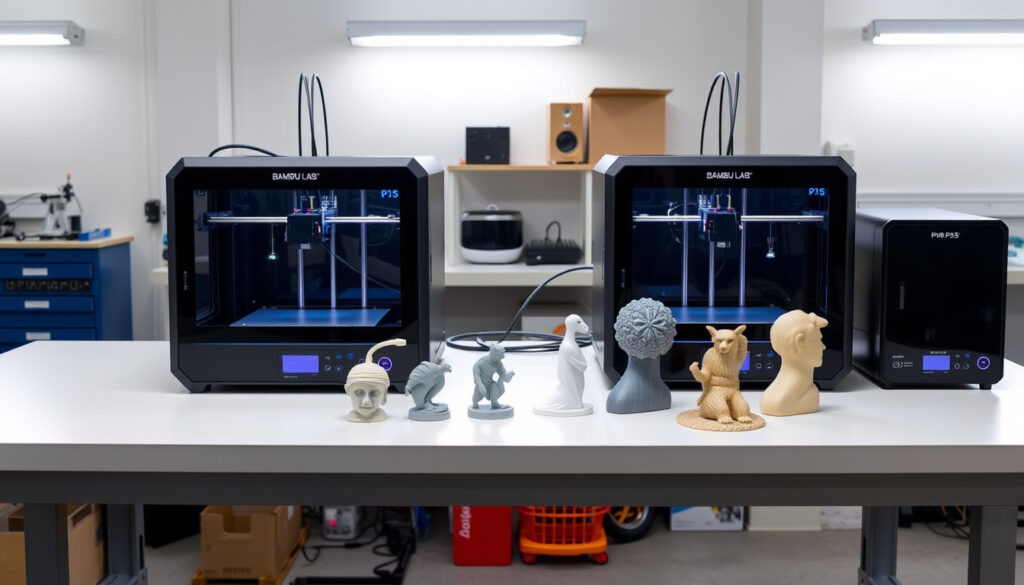
Bambu Lab P1S Review: P2S Comparison, Worth Buying?
If you’ve been eyeing the Bambu Lab P1S, you’re probably aware it was the best-selling 3D printer for a while — and possibly already stumbled across chatter about its successor, the P2S, and some concerning rumors about the company’s direction. Here’s a practical look at where the P1S stands right now, with honest comparisons to the alternatives and a clear-eyed read on whether it’s still worth your money.
Max Print Speed: 500 mm/s · Price (example): €389 · Multi-Color Support: Up to 16 colors with AMS · Acceleration: Up to 20000 mm/s² · Enclosure: Included for high-temp printing
Quick snapshot
- 500 mm/s top speed from verified specs (InnoAddi)
- 2.7-inch button screen, considered dated compared to newer models (InnoAddi)
- P1S Combo priced £479 (old AMS) / £579 (new AMS) in UK market (YouTube review)
- Bambu Lab has not officially confirmed a P1S discontinuation timeline
- Long-term firmware support policy for P1S remains unannounced
- Exact global pricing beyond UK has not been verified
- P1S established as best-selling printer (pre-2025)
- P2S launched as direct successor
- Community discussions point to P1S EOL approaching
- P2S positioned to replace P1S as mid-range flagship
- Buyers weighing P1S value vs. P2S features face a time-sensitive decision
Here’s how the P1S stacks up against its key specs and the competition:
| Specification | Value |
|---|---|
| Print Speed | 500 mm/s |
| Acceleration | 20000 mm/s² |
| Colors with AMS | 16 |
| Enclosure | Yes |
| Out-of-Box Ready | Yes |
| Camera Resolution | 720p low-FPS |
| Net Weight | 15 kg |
Is Bambu Lab P1S a good printer?
The P1S earned its reputation as a reliable workhorse that works right out of the box. Reviewers consistently praise the well-polished hardware and software integration, with one extensive tester noting that “P1S remains reliable for PLA/PETG on budget, legendary workhorse” (InnoAddi). At €389, it delivers solid performance without requiring significant setup time.
Performance and features
The enclosed design supports high-temperature materials, and the multi-color capability through AMS (Automatic Material System) opens creative possibilities for makers. With up to 16 colors available, the P1S handles complex projects that would challenge open-frame printers. Speed-wise, the 500 mm/s maximum is impressive for a printer in this price bracket, backed by 20000 mm/s² acceleration for faster layer transitions.
For hobbyists and small studios wanting reliable PLA and PETG printing without fiddling with settings, the P1S still delivers the goods — but buyers should weigh this against the approaching successor.
Customer reviews
User feedback highlights the P1S ease of use, though some report struggles with larger prints due to warping issues. Community forum discussions note that “P1S struggles with larger prints due to warping issues, unlike smaller/medium pieces” (Bambu Lab Forum). Smaller to medium prints, however, consistently turn out well without the headaches users experience with bigger projects.
Which is better, Bambu Lab P2S or P1S?
The P2S brings meaningful upgrades over the P1S, but whether those improvements justify the cost depends heavily on your situation. The P2S maxes out at 600 mm/s versus the P1S’s 500 mm/s, features a 5-inch color touchscreen instead of the P1S’s dated 2.7-inch button screen, and includes a quick-swap nozzle system that lets you switch nozzle sizes in about 30 seconds (InnoAddi). The extruder force jumps to 8.5kg PMSM Servo compared to the P1S standard stepper, and the camera resolution improves from 720p low-FPS to 1080p high-FPS with AI Spaghetti Detection.
Key differences
Here’s where the P2S pulls ahead decisively: the Adaptive Airflow system draws cool air to prevent heat creep, a problem that can plague the P1S during extended PLA printing sessions. The second-gen NM42pro multi-material unit adds a 65°C drying function for filament, addressing moisture issues before they affect print quality. Call3D’s hands-on testing found that “P2S active cooling prevents heat accumulation and clogs, unlike P1S” (Call3D testing). The camera improvements mean failure detection actually works in real-time, rather than leaving you to discover a spaghetti disaster minutes later.
After hundreds of hours testing
The critical question is print quality. According to extended testing, “there’s realistically no print quality difference” between the two machines when using equivalent settings (YouTube comparison after hundreds of hours). First layers, fuzzy skin finishes, and dimensional accuracy all came out identical across both printers. This means the P2S upgrades are quality-of-life improvements rather than fundamental print quality enhancements.
If you’re already printing successfully on a P1S, the P2S’s faster speed and better camera won’t make your prints look better. The upgrades target convenience and failure prevention, not print quality.
“I don’t really see any reason for anybody to upgrade. Those quality of life improvements are nice to have, but they’re not a big enough improvement.”
— YouTube reviewer after extended P1S vs P2S testing
Bambu Lab A1 vs P1S: Which to choose?
Comparing the A1 to the P1S shifts the conversation from generational upgrades to different use cases. The A1 represents Bambu Lab’s accessible entry point, while the P1S targets makers who need enclosed printing for high-temperature materials like ABS or Nylon.
A1 advantages
The A1 benefits from Bambu Lab’s newer software architecture, and users report fewer growing pains with the platform. For buyers focused purely on PLA and PETG without the enclosed chamber requirement, the A1 offers a lower price point with comparable core performance. No major controversies have emerged specifically for the A1 in the 2024 context.
P1S strengths
The enclosed design sets the P1S apart for serious makers. Heat-resistant materials require stable chamber temperatures that the open-frame A1 simply cannot provide. If you’re printing ASA, ABS, or engineering-grade polymers, the P1S is the only sensible choice in this comparison. The AMS multi-color support also scales further on the P1S, with more robust handling of brittle or moisture-sensitive filaments.
Budget buyers printing PLA only: A1 makes sense. Makers working with engineering materials or wanting multi-color with enclosure: P1S is the clear choice, regardless of successor considerations.
Will Bambu Labs discontinue the P1S?
Community discussions and forum activity suggest the P1S is approaching end-of-life status, though Bambu Lab has not issued an official discontinuation announcement. The P2S launch pattern mirrors what happened with the X1 series, where the original model shifted to limited availability after its successor arrived. Forum discussions note that “P1S likely to reach end-of-life soon, similar to X1, affecting support” (Bambu Lab Community Forum).
Official statements
Bambu Lab has not published a formal EOL (end-of-life) statement for the P1S. The company’s communication around the P1P farewell was more explicit, leaving P1S buyers in a position of assessing signals rather than receiving confirmation. This uncertainty creates a difficult decision window for new buyers.
P1P farewell context
The P1P discontinuation served as a warning sign. When Bambu Lab retired a model, firmware updates eventually ceased, and third-party filament compatibility suffered over time. Buyers considering the P1S now face the real possibility of reduced support within 12-24 months, making the value proposition less clear-cut than it was when the P1S launched.
Watch for Bambu Lab pricing adjustments and inventory shifts. When retailers start clearing P1S stock, that’s your strongest signal that official discontinuation is imminent.
Why is Bambu Lab controversial?
Beyond the P1S itself, Bambu Lab has faced scrutiny over business practices that affect buyer confidence. The company has been involved in legal disputes regarding user-created items, and firmware decisions have sparked community backlash at various points.
Lawsuit details
Reports indicate Bambu Lab has pursued legal action over third-party items, raising questions about the ecosystem’s openness. This creates a tricky situation for makers who want to experiment with modifications or non-standard configurations. The practical impact on everyday printing is minimal, but the precedent concerns community members invested in open hardware culture.
Firmware backlash
Some firmware updates have introduced features that community members view as restrictive or removed functionality they relied upon. This pattern of unexpected changes makes long-term planning difficult for professional users who need predictable behavior from their equipment. The uncertainty around firmware support ties directly into the P1S EOL concerns discussed earlier.
Bambu Lab’s innovation comes with strings attached. The excellent out-of-box experience relies on tight software integration, but that same integration means you’re dependent on the company for future updates and support.
Buying decision: comparison table
Three models, three different priorities: here’s how they stack up across the features that matter most for buyers.
| Feature | P1S | P2S | A1 |
|---|---|---|---|
| Max Print Speed | 500 mm/s | 600 mm/s | Varies |
| Screen | 2.7-inch button | 5-inch touchscreen | Color touchscreen |
| Enclosure | Included | Included | No |
| Quick-swap Nozzle | Manual | 1-clip 30-second | Manual |
| Camera | 720p low-FPS | 1080p AI detection | 720p |
| AMS Support | Yes (original AMS) | Yes (AMS 2 Pro) | Yes |
| High-temp Materials | Yes | Yes + Adaptive Airflow | Limited |
Two models target enclosed printing (P1S, P2S), one doesn’t (A1). For makers working with PLA and PETG, this distinction might seem academic, but the practical implications of heat management become apparent during long print sessions or in cooler environments.
Technical specifications
These verified specs come from review sources and community-verified testing, not promotional materials.
| Category | Bambu Lab P1S | Bambu Lab P2S |
|---|---|---|
| Print Speed (max) | 500 mm/s | 600 mm/s |
| Acceleration | 20000 mm/s² | 20000 mm/s² |
| Screen Size | 2.7-inch button screen | 5-inch touchscreen |
| Camera Resolution | 720p low-FPS | 1080p high-FPS |
| Extruder Force | Standard stepper | 8.5kg PMSM Servo |
| Weight (net) | 15 kg | Similar (with handles) |
| Enclosure | Yes | Yes + Adaptive Airflow |
| Multi-material Unit | AMS | AMS 2 Pro (65°C drying) |
| Print Quality | Proven reliable | Identical to P1S |
Pros and cons
Upsides
- Works right out of the box with minimal setup
- Enclosed design handles high-temperature materials (ABS, ASA, Nylon)
- 500 mm/s speed remains competitive in mid-range segment
- AMS multi-color support up to 16 filaments
- Proven reliability backed by years of community feedback
- Available at lower price as P2S launches
Downsides
- Dated 2.7-inch button screen compared to P2S touchscreen
- Manual nozzle changes (no quick-swap system)
- 720p low-FPS camera lacks real AI failure detection
- P1S nozzle parts incompatible with P2S upgrades
- Approaching EOL with uncertain firmware support timeline
- Heat creep issues during extended PLA printing sessions
The P2S addresses nearly every P1S weakness on paper. In practice, however, the printer still produces excellent results — the question is whether the improvements matter for your specific workflow.
“The P2S isn’t just a better P1S—it’s a replacement. For American consumers, it’s the new king of mid-range 3D printers.”
— Call3D reviewer (hands-on tester)
Related reading: Bose QuietComfort Earbuds Review
When weighing the P1S against the newer P2S model with its AI supervision and servo motors, Finnish P2S vs P1S analysis offers a detailed Finnish perspective on the upgrades.
Frequently asked questions
Can I leave my Bambu Lab P1S on all the time?
Technically yes, but with caveats. Extended PLA printing sessions can cause heat accumulation in the enclosure, potentially leading to heat creep and clogged nozzles. The P2S addressed this with Adaptive Airflow. For the P1S, ensure adequate ventilation and consider periodic cooldown breaks during marathon print sessions.
Which Bambu Labs printer should I buy?
Depends on your priorities. Choose P2S for the newest features and future-proofing. Choose P1S if you want enclosed printing at a lower price point and can accept the older interface. Choose A1 if you’re printing PLA/PETG only and don’t need an enclosure. Each model serves distinct use cases rather than one being universally superior.
Does Bambu Lab P1S support AMS?
Yes, the P1S works with the original AMS (Automatic Material System), supporting up to 16 colors. Newer AMS 2 Pro units are primarily designed for P2S but may offer limited compatibility with P1S depending on firmware versions.
What is the price of Bambu Lab P1S Combo?
In the UK market, the P1S Combo with original AMS retails for approximately £479, while the version with new AMS 2 Pro runs around £579. Prices vary by region and retailer availability.
Is Bambu Lab P1S available in UK?
Yes, the P1S is available through major UK retailers and directly from Bambu Lab’s regional partners. Availability may vary as the product approaches potential discontinuation.
How does Bambu Lab P1S perform in tests?
Testing across multiple review sources confirms consistent print quality for PLA and PETG. Larger prints may experience warping issues compared to smaller projects. The enclosed design performs well for mid-temperature materials but heat management becomes challenging during very long prints.
What materials does Bambu Lab P1S handle?
The P1S handles PLA, PETG, ABS, ASA, TPU, and other standard 3D printing filaments. The enclosed design is essential for temperature-sensitive materials like ABS and ASA that require stable chamber temperatures to print successfully.
Is buying a Bambu P1S a bad idea?
Not necessarily, but timing matters. For hobbyists wanting enclosed printing at a reasonable price, the P1S still offers excellent value. However, professional users and those seeking the latest features should carefully weigh the P2S advantage against the P1S price discount. The approaching EOL creates support uncertainty that matters more for business use than casual projects.
For UK and European buyers, the P1S at €389 represents solid value for an enclosed printer — provided you’re comfortable with the possibility of reduced support within a couple of years. Those wanting the newest features and longest update support window should factor the P2S into their decision, even at a higher price point.
More related posts
 YNW Melly: Case, Music, Health, and Wealth Full Update
 Ledge Point Caravan Park: Map, Prices, Reviews & Pets
 Brianne Howey: Age, Husband, Kids, Ethnicity, and More
 Spud Lite Potatoes: Low-Carb Nutrition, Differences & Recipes
 Tomaree Coastal Walk – Complete 27km Trail Guide
 Diamond Ring Guide: Astrology, Divorce, Shapes & Prices
 Peggy Gou Biography: Age, Net Worth, and Career Facts
 Kareena Kapoor: Biography, Age, Marriage, Net Worth